
The Universal Systems HR module
One HR system forfactories
Hire everywhere, record every day, pay only what is approved. A job post goes out once to LinkedIn, your website and your own job portal; attendance starts from the very file your device already produces; overtime, penalties, leave and shifts are rules you define once and approve day by day.
Build one attendance day yourself
- 15 min grace
- 15 min rounding
- 30 min minimum overtime
- 30 min unpaid break
- Expected
- 07:30
- Worked
- 07:30
- Late
- 00:00
- Overtime
- 00:00
- Shortfall
- 00:00
Every rule is read from the shift, not the employee. Until a manager approves this day, none of it reaches payroll.
How do your people work?
Overview
The HR module is built for businesses that hire from LinkedIn, their own website and local job boards, and record attendance on a biometric or card terminal whose only output is an Excel file: trading companies and workshops, hospitals and clinics, pharmacies, logistics companies, restaurants and holdings.
- Employees128+4 this month
- Present today11791%
- On leave62 sick
- Open positions342 applicants
- Production48
- Sales31
- Finance27
- Warehouse22
- 3 leave requests
- 2 attendance days to approve
- 1 hiring offer
- 6
- pillars: recruitment, files, attendance, leave types, leave requests, shifts
- 4
- hiring channels today: LinkedIn, website, job portal, careers page
- 2
- attendance import formats from any device: xlsx and csv
- 3
- interface languages, with right-to-left layout
If this sounds familiar
The problems that come back every month, at every hire and on every attendance sheet.
- The job post in three places, the applicants in three placesOne on LinkedIn, one on the website, one in a chat group — and the CVs in separate emails.
- An attendance device that only gives an Excel fileThe device produces a file with Arabic-script or English columns and someone has to turn it into salaries by hand.
- Salaries from unapproved daysA correction after payday silently changes the amount, and nobody knows why.
- Rules on each person, not on the shiftChanging the night overtime rate means opening dozens of employee files one by one.
- Leave without rulesNobody is sure which leave is paid, which is half-paid, and what the yearly cap was.
- New employee, typed againThe applicant's details are in the CV, typed again into the employee file, and the offered salary lives somewhere else.
Recruitment: from the job post to the «Hire» button
Publish once, let every application land in one pipeline, and run interviews, offers and hiring without retyping anything.
- New applications3
- Shortlist2
- Interview1
- Offer1
- Hired0
- Code, title, department, location, description and requirements, tags, employment type (full-time, part-time, contract, internship, temporary), openings, closing date, salary range with currency and a public-display choice.
- Public, internal or both decides which channels and the careers page see the post. The publishing panel says whether the post is live, why not, and copies the link.
- Applied → reviewed → interview → offer → hired, or rejected with a reason. Every stage change is timestamped.
- Entered by staff, careers page, external website / API — plus a free source tag and an external reference. «Where do the good applicants come from?» has an answer.
- View or download the CV and cover letter in the browser; files are hashed so a duplicate document is recognised.
- From a template with placeholders (applicant name, post title, interview time…), with CC and subject; a full send log on every application.
- Post, department, salary and currency, start and expiry dates, notes; draft → sent → accepted, rejected or withdrawn.
- The «Hire» panel: start date, department, base salary. The employee file is created, the application becomes «hired» and the post closes if needed.
- By post, stage, source, status; search across applicant name, email and phone; CSV import and export.
Applicant archive and interview management
Everyone who ever applied is the talent pool for the next post; every interview has a round, a mode, an interviewer and a result.
| Sat06/21 | Sun06/22 | Mon06/23 | Tue06/24 | Wed06/25 | |
|---|---|---|---|---|---|
| 09:00 | |||||
| 10:00 | |||||
| 11:00 | |||||
| 14:00 | |||||
| 15:00 |
Tap an empty cell to schedule a meeting
- Technical experience
- Communication
- Problem solving
- Team fit
Advance to next stage
- Name, email, phone, notes; one applicant can apply to several posts over time.
- All applicants stay searchable — deactivate, never delete. Search across name, email, phone and notes; status filter; sorting.
- When creating an application, find the existing applicant by name, email or phone so nobody is entered twice. Import a profile from LinkedIn.
- Application, round number, title, time and duration, in person, phone or video, location or meeting link, interviewers, notes.
- For the applicant and the interviewers from a template, with an optional calendar invite; the send result per recipient.
- Status scheduled, done, cancelled, no-show; result pending, pass, fail, on hold; a score and written feedback.
- A tile and a table on the recruitment dashboard; filter by status, result and mode; search by title, location, applicant or post.
Connect: publish everywhere, receive in one inbox
LinkedIn, your own website and a hosted job portal for every customer — and every application in the same pipeline.
 FacebookSoon
- Mailbox syncSoon
 LinkedIn18 applications this month●
- Your website11 applications this month●
- Usystems job portal13 applications this month●

- Waiting for the first application…
| Candidate | Source | Position | Date | Status |
|---|---|---|---|---|
| Waiting for the first application… | ||||
Every application, from every channel, becomes a row in this table — nothing re-typed · 3 live channels
- LinkedIn18
- Job portal13
- Website11
42 of 1,240 · Time to hire: 21 days
- An OAuth connection per organisation, token refresh, post publishing, application sync and applicant-profile import.
- Create a channel with an API key; the partner site reads open posts and sends applications into the pipeline. Rotate the key whenever you like.
- A public portal in your brand: a list of posts with search and filters, a page per post, an application form with name, email, phone, CV and cover letter.
- On/off, headline, intro text, contact email, whether phone and CV are required, whether cover letters are allowed, a share link.
- Each connection can serve one product or all of the customer's products.
- The provider is defined on the platform; the publishing flow is next.
- Connect a mailbox so emailed applications are created and kept in step with the pipeline.
One file per person
Documents, history, tags, login and ledger — created automatically at the moment of hiring.
- National ID1403/02/15Valid
- Employment contract1403/02/15Valid
- Diploma / certificate1403/02/20Valid
- Professional licence1404/12/01Expiring
- Photo1403/02/15Valid
- Name, email, phone, address, date of birth, gender, marital status, emergency contact, photo; department, position, job title, joining date, salary, opening balance, status, leaving date and reason.
- Contract, ID, certificates and any other file on the employee record; preview in the browser.
- Free tags for site, contract type, skill; every promotion, demotion, transfer and salary change on the file through the «Promote» button.
- An optional link to a user account; every employee is automatically a ledger partner, so payable salary, advances and payments show in the employee's sub-ledger.
- «Hire» on an application creates the file with the offered salary and department.
- Email is unique across the tenant: a group can employ the same person in two products; re-hiring after a soft delete is possible.
- Import employees from xlsx/csv through the same Import drawer; CSV export; global search and the assistant answering «who started this month?»
Drop your attendance device's file; we do the rest
The Import drawer accepts the very file your device already produces: one row per employee-day with check-in and check-out times and the device's own figures. Try it right here.
- Ahmad RahimiIn07:58
- Maryam NooriIn08:20
- Farid KarimiIn08:00
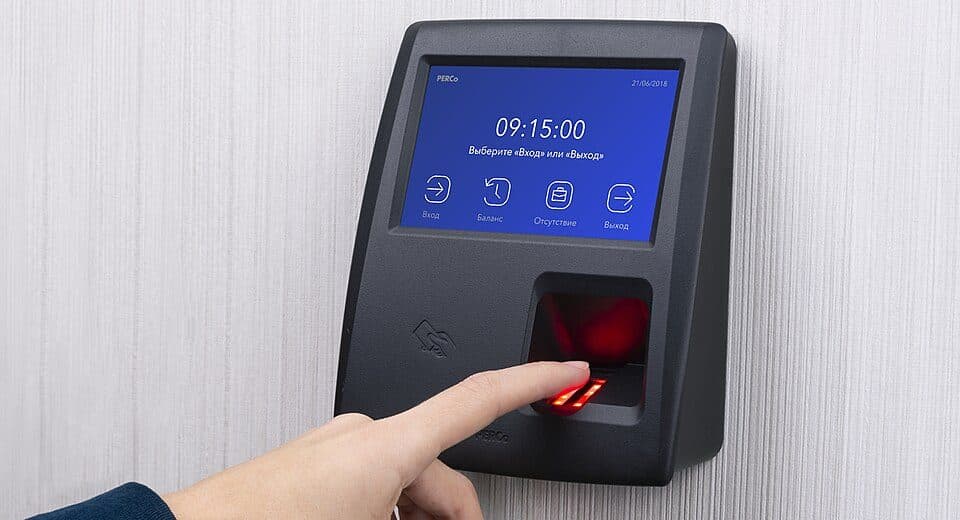
Your fingerprint terminal works as it is
The employee touches the sensor, the device records, Usystems attendance reads the same punch — from the device's export file or over the network.
- The device's export fileThe xlsx or csv the terminal produces; the Import drawer matches the columns automatically.
- Network syncZKTeco and similar terminals on the LAN, through the Usystems sync agent (coming soon).
- Cards and PINsCard and keypad terminals produce the same punch file.
3 punches synced
Import your attendance device's file right here
The same Import drawer that ships in the product, running in your browser: drop the device's export, watch the columns get matched and every row validated before anything is written.
Your file never leaves this browser; nothing is uploaded or stored.
- 1.UploadThe device's .xlsx or .csv; the report title and filter line above the table are skipped automatically.
- 2.Match columnsEnglish or Dari headers (in, out, late, overtime…) are matched to the system fields.
- 3.Review & importJalali or Gregorian dates, times, unknown employees — every row is checked with the product's own rules.
- Drop the xlsx or csv; if the device puts a title above the headers, pick the header row; download the sample template.
- Columns are matched automatically from English and Arabic-script headers (in time / entry time / ورود, late / تأخیر, overtime / اضافه کار, shortfall / کسر کار); correct any match by hand.
- Every row is validated — employee by email, ID or full name; Jalali or Gregorian date; HH:MM or HH:MM:SS time — with per-row errors before anything is written; error report to xlsx.
- Punches are written and the engine recomputes every day; re-importing the same day replaces it.
- The device's worked, late, overtime and shortfall stay beside the computed figures; any difference is flagged with a note, never overwritten silently.
- The raw punch log, employees, leave requests and overtime are imported through the same drawer.
The daily attendance sheet, computed — and approved
Every punch becomes a computed row that a manager approves with one click; only approved days reach payroll.
| Employee | 01 | 02 | 03 | 04 | 05 | 06 | 07 | 08 | 09 | 10 | Late | Overtime |
|---|---|---|---|---|---|---|---|---|---|---|---|---|
| Ahmad Rahimi | P | P | P | L | P | P | O | P | P | P | 1 | 1 |
| Maryam Noori | P | P | L | P | P | L | L | P | P | P | 1 | 0 |
| Farid Karimi | A | P | L | P | P | P | P | P | O | P | 1 | 1 |
| Zahra Ahmadi | P | P | P | P | P | P | H | P | P | P | 0 | 0 |
| Nader Saeedi | L | P | P | P | P | P | L | P | P | P | 2 | 0 |
- Present, absent, leave, holiday, weekend, incomplete (check-in without check-out).
- Expected, worked, break, late, early leaving, shortfall, overtime before and after the shift, leave minutes; first check-in and last check-out — as HH:MM.
- Double check-ins, missing check-outs and night shifts are paired conservatively; an unmatched check-in becomes «incomplete», never an invented check-out.
- Grace, rounding and minimum overtime from the employee's shift; day type from the holiday calendar and the shift's weekend; approved leave per its type's pay rule.
- Approve one day, approve a filtered set in bulk, or unapprove. Approval writes the day's overtime and penalties to payroll; unapproval takes back exactly those.
- Rebuild a range from the punches (approved days untouched unless allowed); filter by employee, range, status, approval, «only rows with a discrepancy»; a summary strip; CSV export.
Overtime and penalties, by rule
Define the tiers once; approved days create their own overtime and penalty rows.
- Grace period
- 15 min
- Break
- 30 min
- Overtime after
- 30 min
- Daily overtime cap
- 180 min
• Every 3 lates a month = half a day deducted• Work on a holiday = 2×
- Worked07:30
- Late00:00
- Overtime00:00
No penalty
- A named multiplier with tiers by day type (working day, weekend, holiday), shift, before/after-shift window and minute range — e.g. the first 60 minutes ×1.25, then ×1.5, holidays ×2.
- Approving an attendance day creates the overtime rows automatically and splits them across tiers. Manual entry is possible too: date, employee, from time to time, rate policy, approve or reject.
- A base rate; tiers for lateness, early leaving and shortfall by day type, shift and minute range; multiplier or fixed amount. Every penalty carries the rule it hit and reaches payroll as a deduction.
- Check-in and check-out grace on the shift decide where lateness starts counting.
- Manual check-in and check-out, edit or delete a wrong punch; a holiday calendar with name, date, type and yearly recurrence that sets the day type, overtime tiers and daily-wage pay.
Leave types: paid, unpaid, half-paid
Every leave type knows how much it pays and how many days a year it grants.
| Type | Paid | Days / year | Document | Carries over | Notice |
|---|---|---|---|---|---|
| Annual | Yes | 20 | — | Up to 5 days | 3 days |
| Sick | Yes | 10 | Yes | — | Same day |
| Urgent | Yes | 5 | — | — | Same day |
| Maternity | Yes | 90 | Yes | — | 30 days |
| Hajj | Yes | 45 | Yes | — | 60 days |
| Unpaid | No | Unlimited | — | — | 7 days |
+ Any other type can be defined
- Name, code, description, active.
- Paid, unpaid, or a custom factor — e.g. 0.5 means half pay.
- An option so the leave day is not counted as absence in attendance.
- Days per year, minimum and maximum days per request, document required (via API).
- Percentage of salary paid and a cap on paid days per year — a payroll override that daily-wage pay reads.
- The list of leave types goes both ways as CSV.
Request → approve or reject → attendance and payroll updated
One request, one recorded decision, and its effect applied automatically to the attendance day and the salary.
- RequestZahra Ahmadi · 1405/06/20 · 09:12
- Manager approvalDept. lead · 1405/06/20 · 11:40
- HR approvalHR manager · Pending
- 4To payrollAutomatic · —
- Remaining
- 12 days
- Used
- 8 days
- Employee, leave type, from date to date, reason; the request date is recorded.
- Pending → approved or rejected, from the approve and reject drawers on the detail page; the decider and the time of the decision are stored.
- Approved leave turns those days into «leave» and applies the type's pay rule.
- Paid leave keeps the day's wage, unpaid does not, a custom factor is applied.
- Filter by employee, type, status, range; the «pending leave» tile is the headline number on the HR dashboard.
- Leave requests through the Import drawer; CSV export.
Shift management: the rules live on the shift
Breaks, grace, rounding, weekends and the overtime and penalty policy of each shift; schedule and roster with clash checking.
| Sa | Su | Mo | Tu | We | Th | Fr | |
|---|---|---|---|---|---|---|---|
| Ahmad Rahimi | |||||||
| Maryam Noori | |||||||
| Farid Karimi | |||||||
| Zahra Ahmadi | |||||||
| Nader Saeedi | |||||||
| Night | 1 | 1 | 0 | 0 | 1 | 1 | 1 |
- Automatic code, title, description, start and end time; overnight shifts are supported.
- Ordered blocks of work and break; paid or unpaid breaks; expected minutes from the paid blocks.
- Check-in and check-out grace, minimum overtime block, rounding step, expected-minutes override, weekend days.
- Choose per shift which overtime policy and which penalty policy apply — the night shift pays differently from the day shift without touching employees.
- Members with a role and a supervisor flag and suggested assignment; the shift schedule on dates with bulk creation and coverage analysis; assignment with statuses, clash detection, a daily roster and each employee's schedule.
- Daily, weekly, monthly or custom per employee, with preview and clash check (via API; the interface is being completed); CSV import and export.
The six pillars, in detail
Open each pillar to see exactly what it does.
Recruitment
- Job post: code, title, department, location, description and requirements, tags, employment type, openings, closing date, salary range (shown or hidden), audience public / internal / both
- Post lifecycle: open → closed → archived; tabs for applicants, applications, interviews and offers of each post on one page
- Publishing panel: whether the post is live on the careers page / job portal, why not if it is not, and a copy-link button
- Applications: applicant + post, CV and cover letter files, notes, tags, review stage; pipeline applied → reviewed → interview → offer → hired, or rejected with a reason
- Source tracking: entered by staff, careers page, external website / API — plus a free source tag and an external reference
- Duplicate detection: CV and cover-letter files are hashed; a duplicate document is recognised
- Applicant archive: everyone who ever applied stays searchable; deactivate instead of delete
- Interviews: round, title, time, duration, in person / phone / video, interviewers; status and result with score and feedback; invitations with a calendar invite
- Job offers: create, send, accept, reject or withdraw from the application
- The «Hire» button: start date, department, base salary; the employee file is created and the post is closed if needed
- Email templates: general, application received, interview invitation, interview reminder, job offer, rejection — with placeholders and a send log
- Recruitment dashboard: open posts, applications, upcoming interviews, pending offers, hiring funnel, applications by source and post, time to hire
Employee files and documents
- Personal file: name, email, phone, address, date of birth, gender, marital status, emergency contact, photo
- Employment file: department, position, job title, joining and start dates, organisation, salary, opening balance, active / inactive, leaving date and reason
- Documents: contract, ID, certificates and any other file on the employee record, with an in-browser preview
- Tags for grouping: site, contract type, skill
- History of promotions, demotions, transfers and salary changes through the «Promote» button
- Optional link to a platform user account; automatic link to a ledger partner (the employee's sub-ledger)
- Tenant-wide email uniqueness: one person across two products, re-hire after a soft delete
- Bulk employee import from xlsx/csv through the same Import drawer; CSV export; global search and smart-assistant answers
Attendance
- Import drawer: xlsx or csv from any device; header-row picker; sample template download
- Automatic column matching from English and Arabic-script headers (in, out, late, overtime, shortfall…); every match can be corrected by hand
- Preview with per-row validation: employee by email, ID or name; Jalali or Gregorian dates; HH:MM or HH:MM:SS times; error report to xlsx
- Commit: punches are written and every day recomputed; re-importing the same day replaces it
- Reconciliation with the device's own figures: its worked, late, overtime and shortfall stay beside ours and any difference is flagged
- Daily attendance sheet: present, absent, leave, holiday, weekend, incomplete; computed figures to the minute
- Messy punches: double check-ins, missing check-outs and night shifts are paired conservatively — never an invented check-out
- Approve a day, approve in bulk, unapprove; recompute; filters and a summary strip; CSV export
- Overtime: named policies with tiers by day type, shift, window and minute range — e.g. the first 60 minutes ×1.25, then ×1.5, holidays ×2
- Penalties: a policy with a base rate; tiers for lateness, early leaving and shortfall; multiplier or fixed amount; reaches payroll as a deduction
- Manual check-in and check-out, edit or delete a wrong punch; a holiday calendar with yearly recurrence
Leave types
- Leave type: name, code, description, active
- Pay rule: paid, unpaid, or a custom factor (e.g. 0.5 = half pay)
- A «count as worked» option so the day is not counted as absence in attendance
- Entitlement policy: days per year, minimum and maximum days per request, document required
- Leave pay policy: percentage of salary and a cap on paid days per year, for daily-wage pay
- CSV import and export
Leave requests and approvals
- Request: employee, type, from date to date, reason; the request date is recorded
- Approval flow: pending → approved or rejected from the drawers on the detail page; the decider and the time of the decision are stored
- Effect on attendance: approved days become «leave» and the type's pay rule applies
- Effect on payroll: paid leave keeps the day's wage, unpaid does not, a custom factor is applied
- Filter by employee, type, status and range; a «pending leave» tile on the dashboard
- Bulk import of requests through the Import drawer; CSV export
Shift management
- Shift definition: automatic code, title, description, start and end time; overnight shifts
- Segments of work and break; paid or unpaid breaks; expected minutes from the paid segments
- Attendance policy: check-in and check-out grace, minimum overtime block, rounding step, expected-minutes override, weekend days
- An overtime policy and a penalty policy per shift — the night shift pays differently from the day shift without touching employees
- Members with a role and a supervisor flag; suggested assignment
- Schedule: a shift on a date with a note and a holiday flag; bulk creation over a range; coverage analysis
- Employee assignment to the schedule with statuses; clash detection; daily roster and each employee's schedule
- Recurring patterns daily, weekly, monthly or custom (via API); CSV import and export
Settings, dashboard and roles
- HR settings: payroll defaults, overtime policies, penalty policies, automation
- HR dashboard: active headcount, payroll cost, pending leave, outstanding advances; employees by department, recent hires
- Six standard reports shared with Payroll
- Roles: HR officer (payroll view only), HR manager (full payroll); no access to invoices, bills or the chart of accounts
- Multi-tenant, three interface languages with right-to-left layout, a full audit trail, search and the smart assistant
Access the size of the role
Handing over HR never means handing over the accounting books.
| CEO | HR manager | Dept. lead | Employee | |
|---|---|---|---|---|
| See every employee file | ||||
| See own department's files | ||||
| See own file | ||||
| Approve attendance | ||||
| Approve leave | ||||
| Publish job posts | ||||
| See salaries | ||||
| See own salary |
One person can hold several roles
- Employees, attendance and recruitment in full; payroll view only; partners and reports view.
- Everything the officer has, plus full payroll.
- HR roles cannot see invoices, bills, the chart of accounts or general documents.
- Every record is scoped to the customer and product; English, Dari and Pashto interfaces with right-to-left layout; Gregorian or Jalali dates.
- Column picker, saved filters, CSV import and export, attachment indicators, attachments with preview on employees and requests.
- Who approved the day, who hired, who applied the promotion, and when.
Better with Payroll
HR and Payroll are two independent modules, each included on its own with every product. Side by side, no figure is ever written twice.
- Approved dayOvertime and penalty rowsPayroll run lineSee what happens in Payroll
- HireEmployee recordSalary structureSee what happens in Payroll
- Approved leavePay factorThe same day in payrollSee what happens in Payroll
- Approving an attendance day writes that day's overtime and penalties to payroll; daily-wage and hourly pay are computed straight from the approved attendance sheet.
- The «Hire» button creates the employee file with the offered salary, and that becomes the basis of the salary structure.
- Paid, unpaid or custom-factor leave is applied to the same day in payroll.
Included with these products
- Accounting and finance
- Manufacturing and assembly
- Holding
- Pharmacy
- OPD and appointments
- Inpatient (IPD)
- Radiology, MRI and CT
- Laboratory
- Logistics
- Restaurant
- Electronics
- Agricultural store
Frequently asked questions
Start today
Try it with your own numbers.
A ready accounting workspace at your own address, with a chart of accounts in place — and sample data only if you ask for it. Fourteen days, no card.
- Your own addressyourbusiness.platform.usystems.af, live in minutes.
- A working ledgerSet up for your kind of business, so the first invoice posts straight away. Sample data if you want to explore first.
- Sign-in by emailWe send the password to your work address. A person answers if you reply.